How do I get my son's football highlights seen by college coaches?
Coaches do not hunt for your son's film. The film has to be delivered to the right coach, in a format they will actually open and watch. A good reel plus consistent outreach gets your athlete evaluated, not offered. This is a process parents can run without hiring anyone, and it starts with understanding how coaches actually consume film.
Published October 19, 2026
What do college coaches actually look for in a highlight video?
Coaches decide in the first 30 seconds whether they will keep watching. According to NCSA Sports, coaches sometimes will not watch more than the first 20 or 30 seconds of a video. That means the best 4 to 5 plays belong in the first minute, not saved for a dramatic finish.
The full reel should run about three to five minutes and show 15 to 30 top plays. IMG Academy advises keeping the video under five minutes and skipping music or special editing effects. Coaches want clean game footage, not a music video.
Identify your athlete before every clip. Insert an arrow or marker and freeze the frame so the coach can locate your son immediately. Without that marker, a coach wastes time trying to find the right player and often moves on.
Football highlights should show in-game footage, not staged drills. IMG Academy states that football and basketball videos need game action, while sports like baseball and softball lean more on technical skills. Shoot in 720p or 1080p, horizontally, with minimal shaking.
Have the first version of the reel done by the end of junior year, using varsity-level competition. IMG Academy recommends that timeline so the film is ready before the senior-year recruiting push begins.
What should go on the title card of a football highlight reel?
The info slide must be the very first thing a coach sees and last five seconds or less. According to a recruiting video breakdown, the "5-Second Rule" means the info slide appears first, stays under five seconds, and includes name, position, GPA, and phone number.
Add the full set of details a coach needs to act. Include name, position, jersey number, graduation year, height, weight, GPA, and measurables. IMG Academy also recommends adding email, phone number, and social media handles clearly visible at the start.
Repeat the contact slide at the end for about 20 seconds. A recruiting video breakdown explains that the contact slide should appear at the beginning for five seconds and again at the end for 20 seconds, giving coaches time to write down the information.
Keep the title card plain text on a clean background. No graphics that slow down reading. Coaches are not evaluating your design skills. They are deciding whether to keep watching and whether they can reach your son.
Which schools should we send the film to?
Build a realistic target list by level, not just dream schools. The list should include D1, D2, D3, NAIA, and JUCO programs. NCSA Sports frames recruiting as a matching process, and IMG Academy stresses that the film has to fit the level of play.
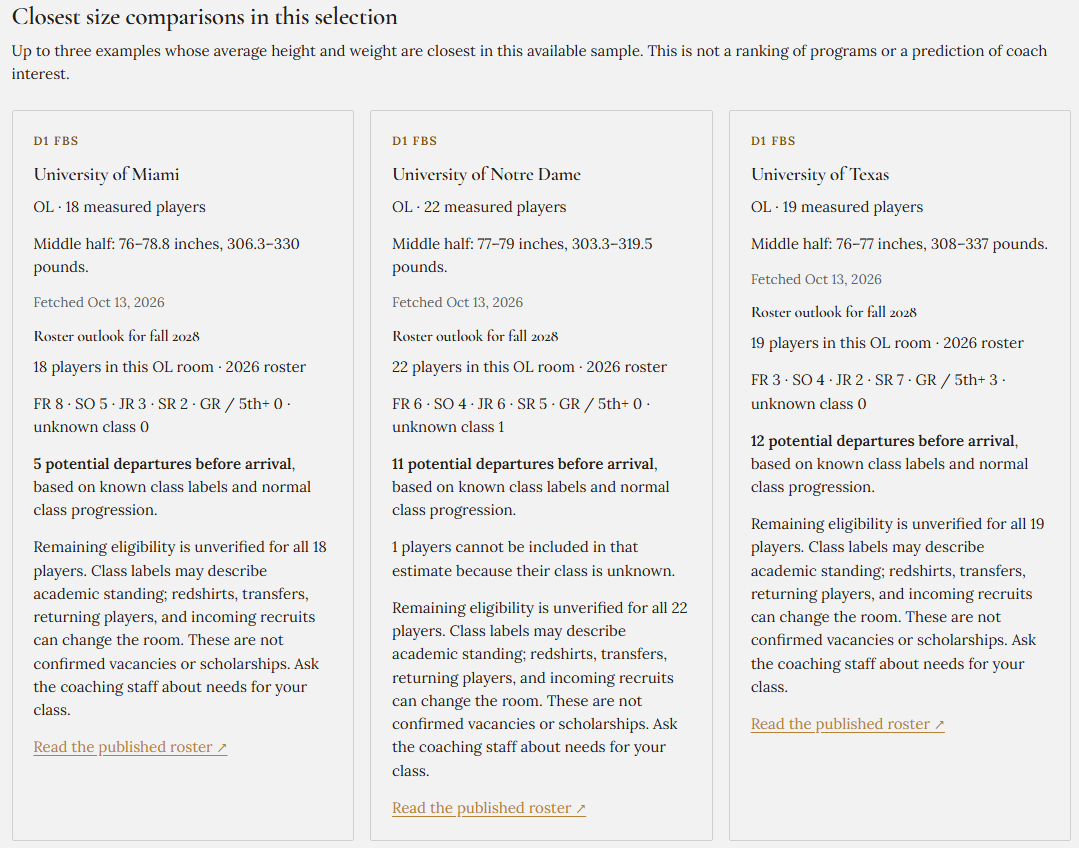
Match your athlete's measurables and film against actual rosters at each program before emailing. If your son is a 5-foot-10, 190-pound linebacker, look at what the current roster shows at that position. A program with no player under 6-foot-1 at linebacker is probably not a realistic target.
Fill out the recruiting questionnaire on every target school's athletics site first. Most programs require that questionnaire before they log an athlete as a prospect. Sending film without completing the questionnaire often means the email gets ignored.
Treat JUCO and D3 as real options, not fallbacks. JUCO programs often provide the fastest path to being seen by four-year schools, and D3 programs offer genuine playing time. The goal is evaluation and opportunity, not prestige.
Cap the list at a number you can genuinely follow up with each month. Twenty schools you actually email beats 80 schools you never contact again.
How do we actually send highlights to a college coach?
Email the position coach and the recruiting coordinator from the athlete's own account, not a parent's account. Coaches notice when the email comes from a parent. The athlete should own the outreach, even if a parent helps draft the message.
Keep the email short. Name, grad year, position, school, height, weight, GPA, one link, and one sentence of interest. Coaches skim. A long email gets deleted.
Here is a sample email a parent can copy and adjust:
Subject: 2027 LB, 6'1" 210 lbs, Jefferson High School
Coach [Last Name],
My name is [Athlete Name], a 2027 linebacker at [High School] in [City, State]. I am 6'1", 210 pounds, with a 3.4 GPA. I completed the recruiting questionnaire for [School Name], and my junior season highlight reel is here: [Hudl or ReelTuna link]
I am interested in [School Name] because [one specific reason]. Thank you for your time.
[Athlete Name] [Phone number]
Post cuts on X and tag the program and position coach. Keep Instagram for a shorter version. Coaches do scroll social media, but the direct email remains the primary delivery method.
How long should a football highlight video be, and how often should we update it?
Target three to five minutes. NCSA Sports recommends about three to five minutes, and IMG Academy says under five minutes is the ceiling, not the goal. Shorter is better if the plays are strong.
Refresh the reel quarterly with new film, stats, and accolades. IMG Academy recommends quarterly updates so the film never looks stale.
Replace older clips rather than adding to the end. The best plays stay first. A coach who watched the old reel should see a better reel, not a longer one.
Send updated film after each season and after any camp or combine performance. New verified numbers or new game film give you a reason to email again.
Full game film stays in reserve. Send it only when a coach asks for it. Coaches use full game film to confirm what the highlight reel suggests, not as a first impression.
How do camps and in-person exposure fit with sending film?
Camps put a face and a personality to the reel a coach already watched. The film gets the coach's attention. The camp lets the coach see how your son moves, listens, and competes in person.
Choose camps at schools already on your target list. IMG Academy frames the recruiting process as one where film and direct contact work together.
Tell the coach you will be at their camp in the same email that carries your film. That gives the coach a reason to remember the name and watch for the athlete.
Follow up after camp with a short note and the updated reel. Thank the coach for the instruction, mention one thing you learned, and include the new film link.
What does follow-up and tracking look like week to week?
Keep one simple log: who was emailed, when, who replied, and who invited your athlete to camp. A spreadsheet works. The log keeps the process honest and prevents double-sending or forgetting a program.
If you would rather not build that spreadsheet yourself, ReelTuna handles both halves of this job. It cuts the highlight reel from your game footage once you mark your athlete, and it keeps every coach on one board with the calls, emails and camps logged. Each coach gets a private reel link, and the board updates when that coach watches. That way you know which programs actually watched before you send the next email.
Silence early is normal. NCAA contact rules limit when coaches can reach out, so no reply is not a rejection. NCSA Sports notes that coaches receive enormous volumes of film, and persistence is what gets an athlete noticed in that pile.
Re-send with new senior film rather than sending the same link again. A new reel gives the coach a reason to open the email. The same link twice gets ignored.
Follow up roughly every three to four weeks during the active recruiting window. Space the contact enough to stay visible without becoming noise.
What is the parent's job versus the athlete's job in recruiting?
The athlete owns the email account, the calls, and the conversations with coaches. Coaches recruit the player, not the parent. An athlete who cannot send a short email or make a phone call is not ready for a college program.
The parent handles logistics: filming, travel, camp registration, and keeping the outreach log current. That is real work, and it matters. But it stays behind the scenes.
Parents should not email coaches pretending to be the athlete. Coaches can tell, and it hurts credibility. Help your son draft the email, then let him send it from his own account.
Keep the tone at home steady. This takes months. The athletes who get evaluated are usually the ones who keep working the process after the first round of emails goes unanswered.
Frequently asked questions parents ask about football highlight reels
How long should a highlight video be for college coaches? Three to five minutes, with the best plays first. NCSA Sports and IMG Academy both recommend that range.
How do I get my son's football highlights seen by college coaches for free? Recruiting questionnaires, X posts, and school email addresses cost nothing. The paid tools help with cutting and tracking, but the core outreach can be done without spending money.
Do coaches find athletes on their own? Rarely. Film gets delivered, it does not get discovered. NCSA Sports reports that athletes with a highlight video on their recruiting profile are 12 times more likely to be viewed by a college coach than those without one, but the athlete still has to send the link.
What is Hudl, and do we need it? Hudl is a film hosting platform. It is useful for storage and sharing, but coaches still need the link sent to them directly. Hosting the film is not the same as delivering it.
How many coaches actually watch, and what response rate should we expect? There is no reliable number, and it varies a lot by level and position. Expect replies to be slow and uneven. Some coaches will never respond. Others will respond months later. The process rewards consistency, not speed.
The film is the easy part to get wrong and the outreach is the easy part to quit. If you want help with both, ReelTuna makes a clear highlight reel from your own game footage, compares your athlete's size with the players on each school's published roster, and keeps every coach email, reply, and follow-up in one place. Start with the reel, send the first ten emails this week, and let the process do its work.
Key Takeaways
- Athletes with a highlight video on their recruiting profile are 12 times more likely to be viewed by a college coach than those without one.
- Coaches often will not watch past the first 20 to 30 seconds, so the best 4 to 5 plays belong in the first minute.
- A recruiting reel should run about 3 to 5 minutes and show 15 to 30 top plays, with no music or editing effects.
- The info slide must appear first for 5 seconds or less and include name, position, GPA, and phone number, then repeat at the end.
- Aim to have the first version of the reel finished by the end of junior year and update it quarterly.
- Email the position coach and recruiting coordinator from the athlete's own account, and fill out the school's recruiting questionnaire first.
- Early silence from coaches is normal under NCAA contact rules and is not a rejection.
References
- How to Make a Highlight Video — IMG Academy, date unknown
- The Importance of Highlight and Skills Videos — NCSA Sports, date unknown
- How To Get College Coaches To Call You (Highlight Video Secret) — 2025-12-20